
Altiwerk
For SAP Field Service and Asset Management customers

Extensions that make SAP FSA do what you need.

Altiwerk builds licensed extensions for SAP Field Service and Asset Management (formerly SAP FSM): 9 products, most of them a single install link away, a studio your team builds the rest in, a factory that turns anything they build into an install link of its own — desktop, mobile, or both — and a connectivity engine that runs on your own BTP, so your records stay in your tenant.

Ed25519-signed licensesYour records stay in your tenantRuns inside the FSA Shell
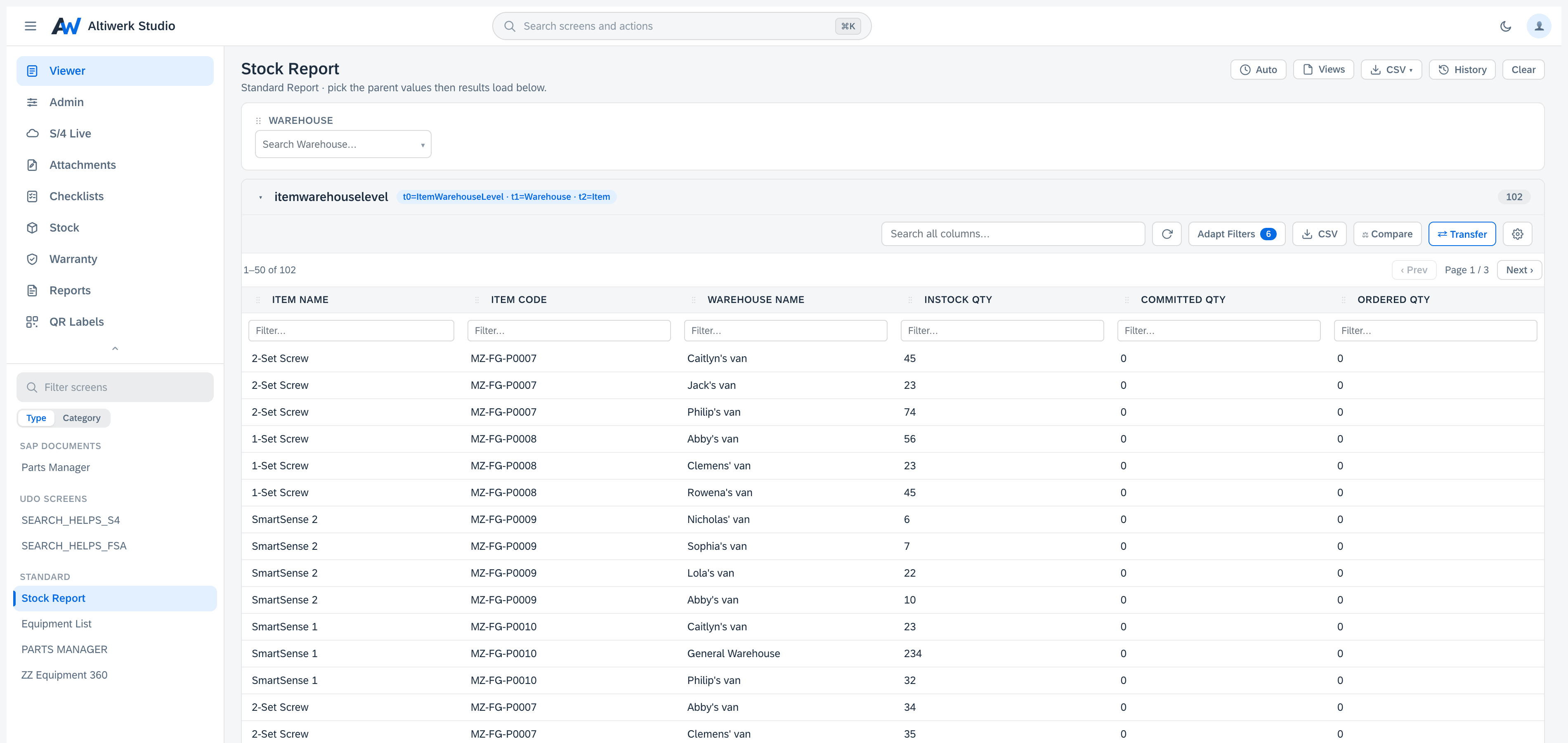
A standard report joining three sources into one result block, with a warehouse driver above it, per-column filters, and 102 rows paged fifty at a time
Altiwerk Studio — a standard report, running inside the FSA Shell

Built to meet the bar of enterprise FSA customers

Signed licensing
Tenant-resident data
Auditable contracts
EU-billed, EUR-priced
Why Altiwerk

Enterprise-grade extensions, without the consulting bill.

Built for the FSA Shell

Every extension runs inside the FSA Shell as a first-class outlet — not a separate web app. Your users stay in the tools they already know, on desktop and on the mobile Web Container.

Licensed, not leaky

Every license is signed with Ed25519 and bound to your FSA accountId. Sharing keys across tenants fails server-side. Contracts expire on time, automatically.

How it works

Your records stay in your tenant

FSA API calls go directly between your browser and your FSA cluster. S/4 calls go through an engine running on your own BTP. Neither path crosses our infrastructure — we validate licenses, and that is all.

Data flow
See it work

Not a mockup — the real thing, recorded.

Four flows, inside a real FSA tenant, end to end. Pick one.

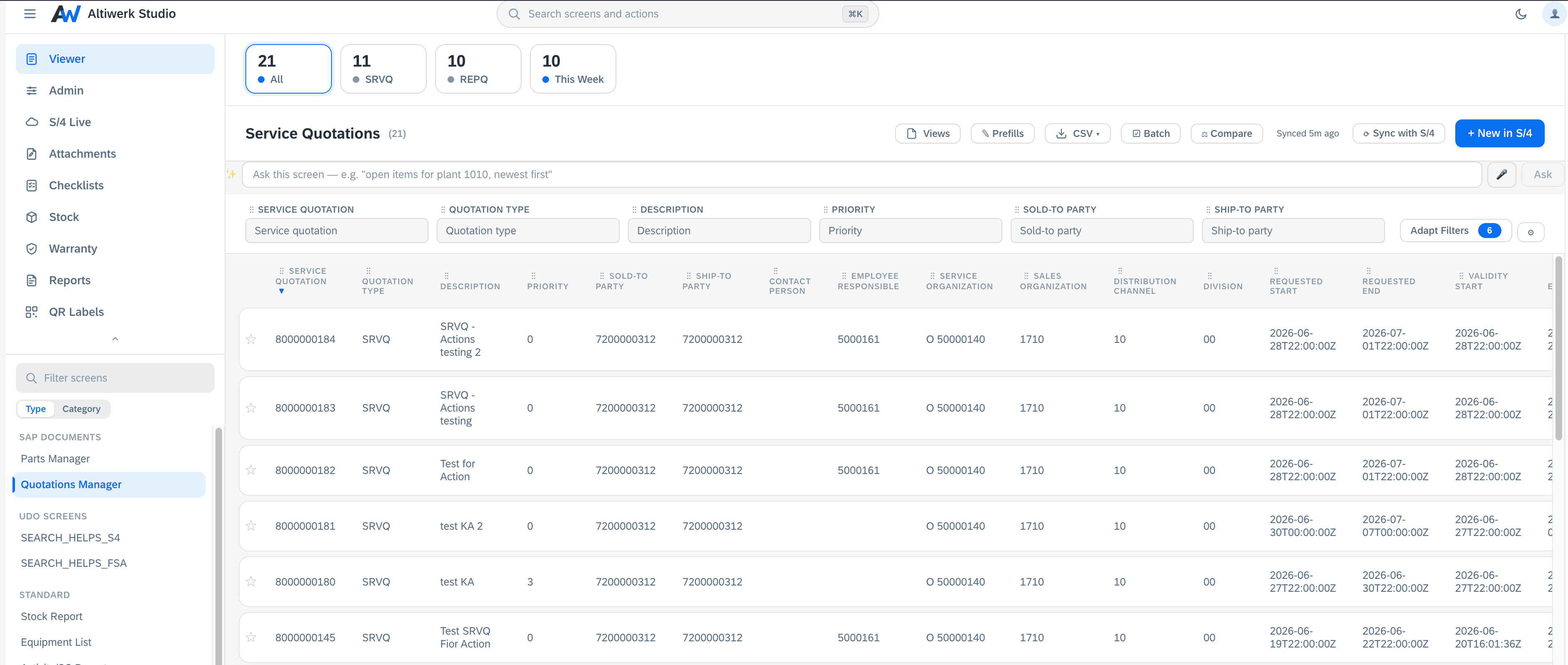
One screen, from the studio to a tab on a Service Call — no second deployment · 56s
Build your own

Altiwerk Studio

Design and run your own data screens inside FSA — four screen types, no code.

  • Standard reports across any FSA object, joined with UDOs and live S/4 in one screen
  • UDO screens with two-way S/4 sync, bulk CSV import and undo
  • SAP document screens — header, items and sub-items, pushed back to S/4
  • Custom screens for fully bespoke layouts (Complete SKU)
SKUs
Same install · License decides
Single
Pick one of Standard / UDO / SAP
Dual
Any two of Standard / UDO / SAP
Complete
All four — incl. Custom screens
Most complete

The license you buy decides what's enabled. Pricing on the product page.

And any screen you build ships as its own extension.

One click turns a screen into an installable FSA extension, a mobile Web Container app, or both — with a short install link of its own, and no second deployment on your side. Ever.

Web extensionMobile Web Container18 places in FSA
Extension Factory
Platform

The two everything else runs on.

Every one-link product on this site installs through the Extension Factory's own machinery, and every live S/4 read goes through the engine S/4 Live is the front door to. Both are licensed on their own — and both are yours to point at your own screens and your own system.

Extension Factory

Turns a screen into a product

A screen your team built is useful. A screen that appears on the equipment page, for the people who never open the studio, is a product. The factory turns one into the other — one click, one link, no second deployment.

One screen
Built in the studio
WebA tab, a panel or a tile in the desktop Shell
MobileA URL you paste into an FSA Web Container
BothOne screen, published to each surface at once

A web install picks from 18 placements — Service Call, Activity, Equipment and the other master-data pages, the sidebars, the Dispatching Board, the Partner Portal, and the Shell home screen.

  • One deployment, ever — not one per screen. Publishing the tenth costs exactly what publishing the first did.
  • The screen picks up the record it is hosted on, with no configuration — and follows the user to the next one.
  • Revoke, reactivate or delete any install on its own. The others carry on untouched.

S/4 Live

Engine

Live S/4, before you build anything

Point it at your S/4 system and browse what is actually there. Entity sets, fields and keys come from the service's own $metadata, so the lists are never a stale copy of someone's spreadsheet — and every read is live. Nothing is replicated into FSA.

  1. 1Pick an entity setDiscovered from your own system — point it at S/4 and it lists what is actually exposed.
  2. 2Pick a keyWith one-click example values, including dates in the exact form that system accepts.
  3. 3Read the live recordFilters and paging over live data. Nothing is copied into FSA.

Sells standalone — where the app shows only S/4 Live — or as a tab on any licence. Needs the connectivity engine running on your own BTP.

The rest of the family

6 more products, already shipping.

Each one exists because a customer named a specific problem. Each is licensed on its own, and each installs from a single link — through the same Extension Factory machinery your own screens use. No setup, no deployment on your side.

Compare all 9Across all 9, 3 read live S/4 data through the engine, over 13 curated mappings.
9
licensed products
4
screen types to build your own
13
curated S/4 mappings
238
releases shipped
Get started

Add a paid FSA extension in an afternoon.

Buy a licence, paste your key, and your team starts on day one. Or kick the tires first with a 14-day trial license.